
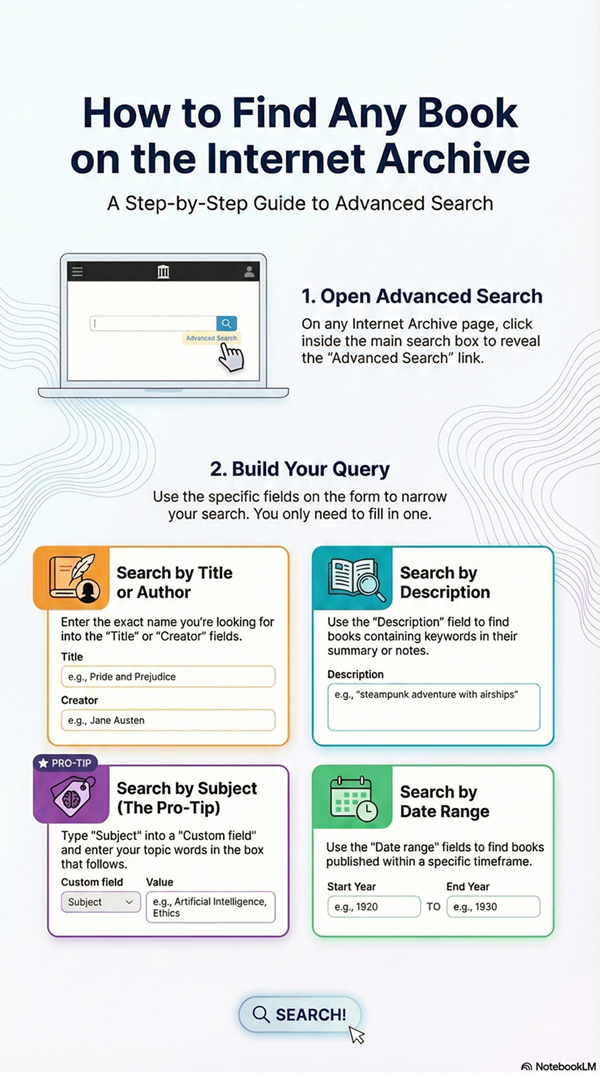
Search Internet Archive Library for Books by Subject. The Internet Archive has millions of free published books, so you will likely find far more books here than on any other Internet site. The procedures for nonfiction and fiction books are much the same, except for a variation described in Step 6, below. Step 7 explains how to search for works by an Author, and Step 8 covers searches by Title.
1. Nonfiction Search (Desktop & Mobile)
- Desktop: Go to archive.org and click Texts at the top of the page.
- Mobile: In the Main Menu, click Texts, then All Texts.
2. Search by Subject
- In the search box, use the following format:
subject:(your broad subject term) - Important: Enclose your subject term in parentheses
(), and do not leave a space after the colon:. - Example:
subject:(engineering) - Select Search Metadata from the drop-down box, then click Search this collection or press Go.
3. Refine Results by Subject (Optional)
- Desktop: In the search results, look at the left column for the Subject filter to view a list of related subjects.
- Mobile: Tap Filters, scroll down to Subject, and tap More to see the full list.
- Select the relevant subjects you want to include and click Apply Filters.
4. Improve Search with Topics
- Desktop: In tile or compact list views, hover your mouse over any book to see its Topics metadata. Clicking a topic will open a new search for that specific topic.
- Mobile: This feature isn’t available on mobile. Tap a book, and look in the metadata below the book cover for its Topics.
5. Use Quotation Marks instead of Parentheses for more Precision
- Putting a phrase inside quotation marks will search for the exact phrase.
- Example:
subject:"electrical engineering" - Quotations will search for the words in the phrase together in the same order, while
parentheseswill search for any book where all the words appear.
6. Search FICTION Books
- Follow Steps 1 and 2, but add
AND fictionafter your subject term. - Example:
subject:(engineering) AND fiction - Note:
ANDmust be capitalized.
7. Search for Books by an AUTHOR
- In the search field, use the format:
creator:(last name, first name) - Important: Enclose the author’s name in parentheses
(). - Example:
creator:(doyle, arthur conan) - Click Search this collection. To get more results, try variations of the author’s first name(s) or initials.
8. Search for Books by TITLE
- In the search field, use the format:
title:(Any Book Title)
9. Century Past Subject Directory
- Instead of the search procedure above, you can use the Century Past Subject Directory or A-Z Directory to find a page with your subject, and you can then choose among dozens of related topics where subject searches have already been done.
Related Pages on Century Past
Here are CenturyPast.org pages with books or other resources on related subjects. Use the top Menu to look through our 400+ pages.